
Peoplefold and Toggl Track solve time tracking differently. Peoplefold is built specifically for service teams and agencies that bill by the hour, it centres on project burn rates, budget-risk alerts and a structured multi-stage approval workflow.
Toggl Track is broader, more general-purpose time tracker with a lighter interface, a generous free plan, and a large integration library (100+apps). If your business lives and dies by project budgets and client billing accuracy, Peoplefold’s workflow is purpose built for that. If you want simple, flexible time tracking across many types of work with minimal setup, Peoplefold is the most established widely used option.
Both are real, current products as of 2026. This guide compares them feature by feature so you can decide which fits your team.
What is Peoplefold?

Peoplefold is a time tracking and project billing platform built for teams that bill clients by the hour; agencies, consultancies, and other professional services businesses. Its core focus is connecting logged hours directly to project budgets and billing accuracy, rather than treating time tracking as a standalone activity.
Peoplefold centres on:
- Weekly time grid with H:MM precision entry and bulk entry support.
- Project tracking across fixed, time and materials (T&M), and Retainer billing models.
- Four stage approvals workflow: Pending >Submitted >Under Review > Approved/rejected, with rejection reasons and a full audit trail.
- Burn rate intelligence, showing real-time budget vs logged hours, weekly burn rate, and forecasted completion dates.
- Capacity planning to visualize over and under allocation across a team.
- Reports and analytics exportable as CSV, Excel, or PDF.
- Service catalogue structure (Service verticals, Work types, Tasks) for consistent categorization.
- Six tier role based across control, from team member to Super Admin.
- Custom branding, letting teams apply their own logo, colours and app name.
What is Toggl Track?
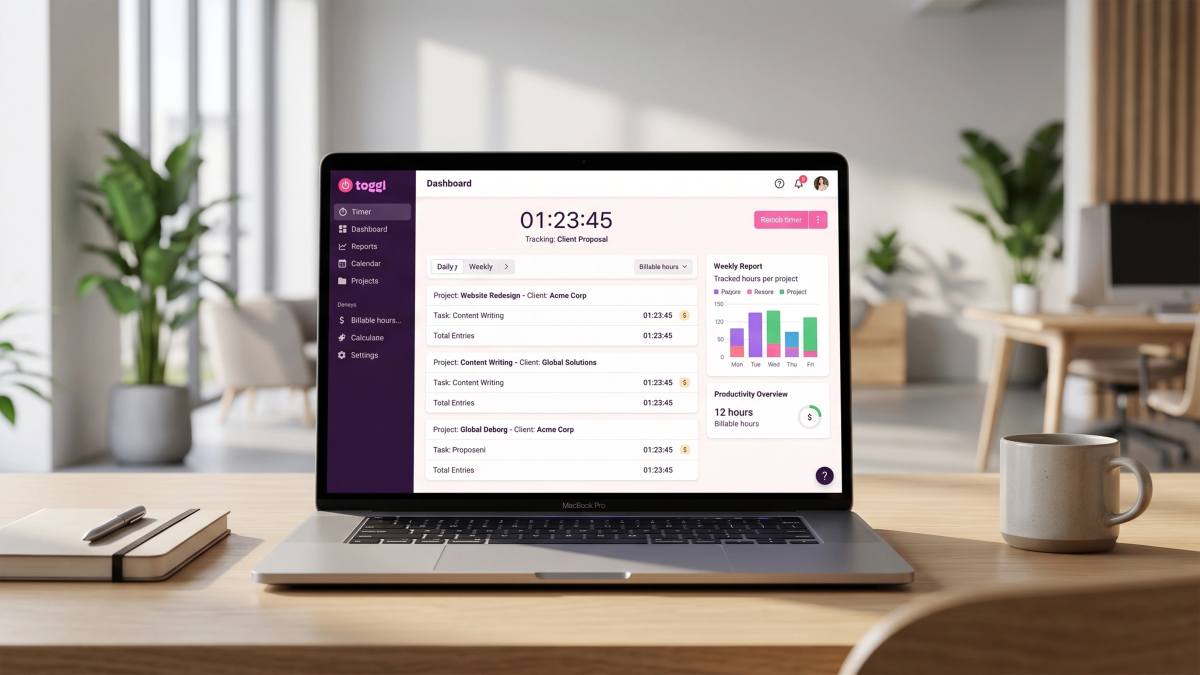
Toggl Track is a widely used time tracking tool aimed at freelancers, teams, and agencies. Its strength lies in ease of use, cross platform tracking and a large integration ecosystem.
Toggle track offers:
- Time tracking across web, desktop, mobile, and browser extensions, with a background auto-tracker.
- Integrations spanning tools like Jira, Asana, Notion and Slack, along with an API and MCP support for custom connections.
- A free plan supporting up to five users, unlimited time tracking, unlimited projects and clients, idle detection, a Pomodoro timer, calendar integration, over 100 integrations, and CSV/PDF report exports.
- Timesheet approvals, available on premium and enterprise plans; a submit, a review, approve/reject flow with an audit log, though structured more simply than peoplefold’s four-stage process.
- Reporting that can be filtered and grouped by project, client, or team.
Project time estimates and billable rates from the Starter plan up.
Peoplefold vs Toggl: Feature Comparison

| Feature | PeopleFold | Toggl Track |
|---|---|---|
| Time entry style | Weekly grid, H:MM precision, and bulk entry | Timer-based and manual entry with an auto tracker |
| Approval workflow | Four-stage workflow: Pending → Submitted → Under Review →Approved/Rejected; included from paid tiers | Submit → Approve/Reject; available on Premium and Enterprise plans only |
| Budget/burn rate tracking | Real-time burn rate dashboard with at-risk alerts and forecasts | Profitability and project estimate tracking available on the Premium plan |
| Capacity planning | Built-in team allocation view | Not a core focus of Toggl Track itself |
| Billing models supported | Fixed, time and materials (T&M), and retainer | Billable rates supported; not framed around named billing models |
| Integrations | The integrations for peoplefold are in progress. | 100+ integrations, including Jira, Asana, Notion, Slack, plus API/MCP |
| Free plan | Permanent free plan (1 user, up to 5 projects) | Permanent free plan for up to five users |
| Custom branding | Included: logo, brand colour, app name, and support email | Not a standard Toggl Track feature |
| SSO | Microsoft and custom SSO available on Enterprise | SSO typically available on higher tiers |
Time Tracking: Grid Based vs Timer-Based
This is the most immediate difference between the two tools. Peoplefold uses a weekly grid view, where hours are entered per project per day in H:M M format, with bulk entry for pasting a row of hours across the week. This suits teams that log time in structured blocks tied to specific service categories.
Toggl Track is built around a start/stop timer and an automatic background tracker, which suits people who want to capture time as it happens rather than entering it after the fact. Both approaches are valid; the right one depends on whether your team tracks time in real time or logs it retrospectively.
Productivity and Workforce management
Peoplefold leans further into workforce management than Toggl Track does. Its capacity planning module visualizes over and under allocation across a department, and its service-catalogue structure (Service verticals>Work Types>Tasks) is designed to keep billable categorization consistent across a growing team.
Toggl track’s strength here is breadth rather than depth, it connects time data to a wide range of external project management and communication tools rather than building deep native workforce planning features into the product itself.
Reporting and Budget Visibility
This is where peoplefold’s positioning is most distinct. Its burn rate dashboard shows, for each project, budget consumed vs logged hours, a weekly burn rate, a forecasted completion date, simple reporting similar to excel and status flags, On Track, Over Burning, or Budget Exhausted with automatic alerts to project leads.
Toggle Track’s reporting is flexible and exportable (CSV, Excel, PDF) and, on the Premium plan, includes profitability analysis and project estimate tracking. It doesn’t market a dedicated burn rate forecasting dashboard in the same way Peoplefold does.
Ease of Use and Onboarding
Toggl Track has a longstanding reputation for a clean, low friction interface, particularly for solo users and small teams, this is echoed consistently across independent reviews of the product. Peoplefold's interface is more structured around approvals and budget dashboards, which suggests a slightly steeper initial setup for teams new to formal timesheet flows, though its product page states setup takes place under five minutes with no IT support required.
Pricing Comparison
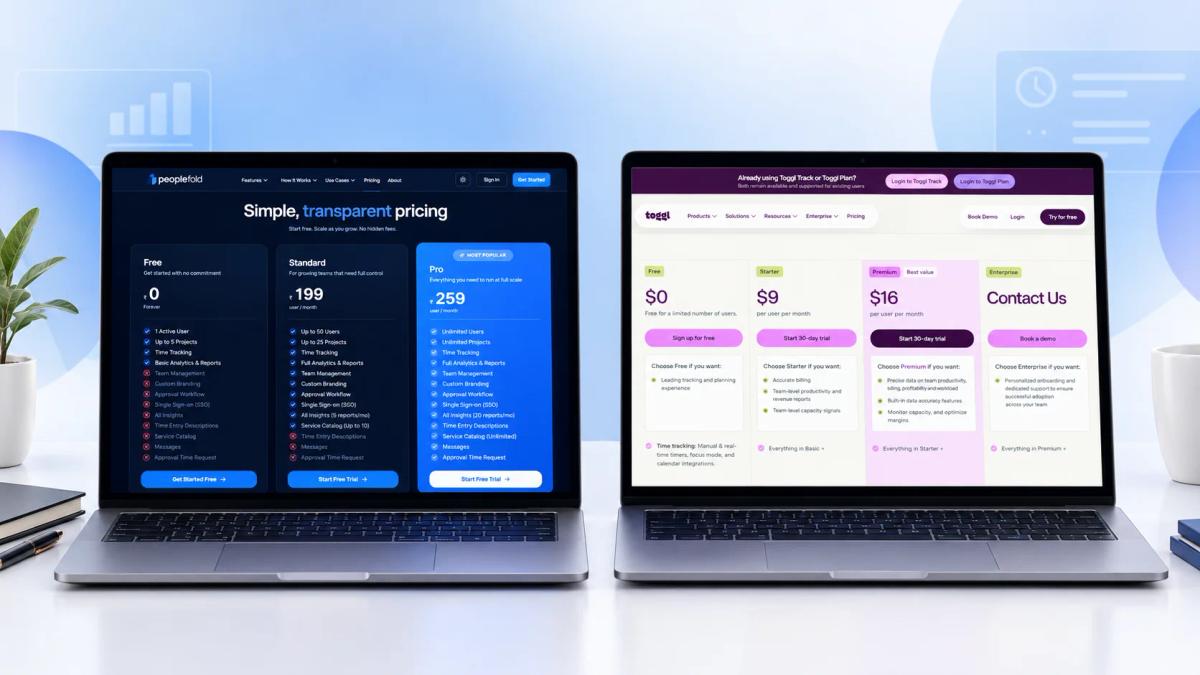
Peoplefold’s pricing includes three tiers, all billed per user, per month, with a genuine permanent free plan rather than a time limited trial:
| Plan | Price | Key Limits |
|---|---|---|
| Free | Rs.0 forever | 1 active user, up to 5 projects, basic analytics and reports. |
| Standard | Rs. 199/user/month | Up to 50 users, up to 25 projects, full analytics and reports, AI insights (5 reports/month), Service catalogue (up to 10) |
| Pro (Most popular) | Rs.249/user/month | Unlimited users, unlimited projects, full analytics and reports, AI insights (20 reports/month), unlimited service catalogue. |
All three peoplefold tiers include time tracking, team management, custom branding, approval workflows, SSO, time entry descriptions, messages, and approval time requests; the difference between tiers come down to user/project limits and the depth of analytics and AI insights available.
| Plan tier | Peoplefold | Toggl Track |
|---|---|---|
| Free | Rs.0/user/month forever: 1 user, up to 5 projects | Free plan, permanent, up to 5 users. |
| Entry paid tier | Standard; Rs. 199/user/month, up to 50 users | Starter; from $9/user/month |
| Top tier | Pro; Rs.249/user/month, unlimited users and projects. | Premium; $18/user/month enterprise available at custom pricing. |
Pricing structure note: Both platforms now price per user, per month, with total monthly cost scaling directly with team size. The clearest differences are in what’s included at each price point: Peoplefold’s paid tiers bundle approval workflows, custom branding, and SSO in from the Standard tier, while Toggl Track gates approvals and profitability analysis behind its premium tier specifically.
Because currencies and feature sets differ, it’s worth comparing the actual cost for your team size and required features directly, rather than assuming one platform is cheaper across the board.
Which Type of Team Each Platform Suits
Peoplefold tends to fit:
- Agencies and consultancies billing clients by the hour across fixed, T&M, or Retainer models.
- Teams that need a formal, multistage approval process for timesheets.
- Organizations that want proactive budget risk alerts before a project overruns.
- Teams that want their own branding (logo & colour) on the platform, their clients or staff use.
Toggl Track tends to fit:
- Freelancers and small teams that want to start tracking time immediately, free of cost.
- Teams already using a wide range of tools (Jira, Asana, Notion, Slack) that want time tracking to plug into that existing stack.
- Businesses that prioritize a simple, timer-first tracking experience over deep budget forecasting dashboards.
Neither platform is a universal “better choice”; the right one depends on whether your priority is broad, flexible tracking with wide integration support, or a structured budget focused workflow built specifically around billing accuracy.
FAQs
Is Peoplefold free to use?
Yes. Peoplefold offers a genuine permanent free plan (Rs.0 forever) for 1 active user and up to 5 projects, with basic analytics and reports included. Paid plans start at Rs.199/user/month for the standard tier.
2. Does Toggl Track have a free plan?
Yes. Toggl Track’s free plan supports up to 5 users with unlimited time tracking, unlimited projects and clients, and 100+ integrations, with no time limit and no credit card required.
3. Which tool is better for agencies that bill hourly?
Peoplefold is built specifically around agency billing workflows; it supports Fixed, T&M, and Retainer billing models with real time burn rate tracking. Toggl Track supports billable rates and profitability tracking but isn’t framed specifically around named billing models.
4. Which platform has stronger budget risk tracking?
Peoplefold's burn rate dashboard is purpose-built for this, it flags projects as On Track, Over Burning, or Budget exhausted in real time. Toggl Track offers profitability and estimate tracking on its premium plan but doesn’t market a comparable real time risk flagging dashboard.
5. Can I try both platforms before committing?
Yes. PeopleFold offers a permanent free plan for a single user, and Toggl Track offers a permanent free plan for teams up to 5 users, so both can be evaluated hands-on before a paid commitment.